UK MOT Garages Mapped with LeafletJs
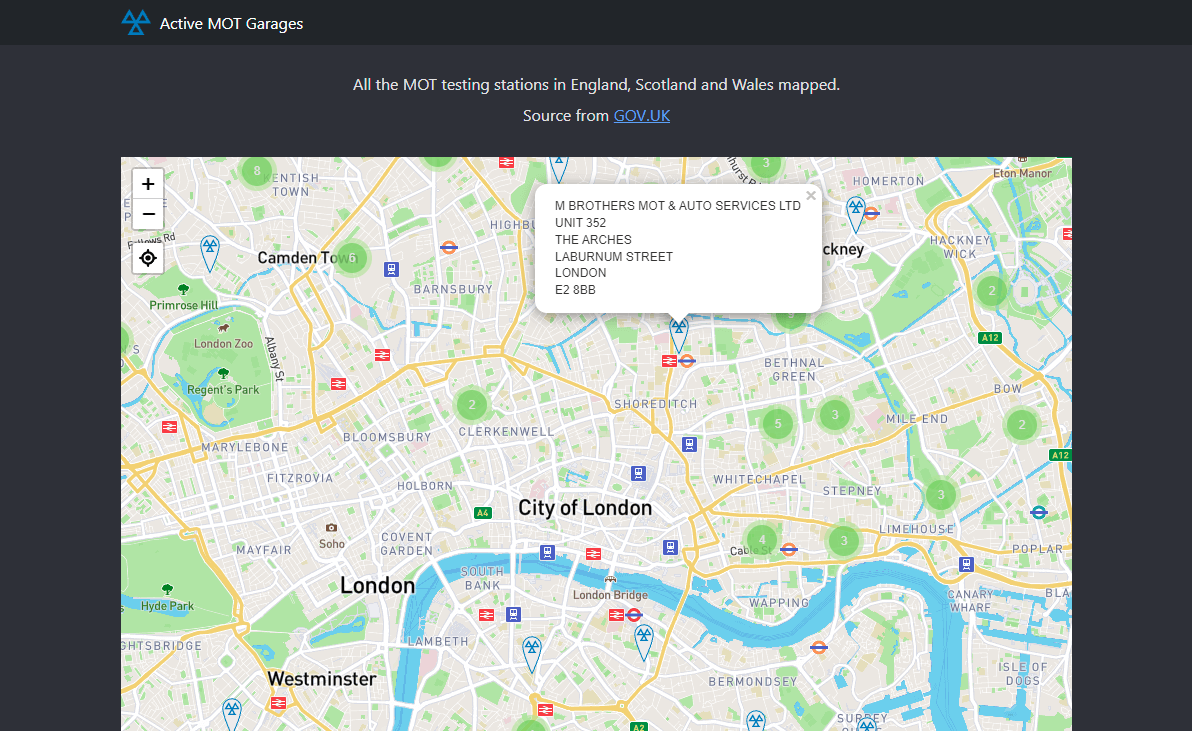
Foreword
I’m going to be talking about LeafletJs a little bit later on and wanted to preface this post by echoing a message from it’s creator, Vladimir Agafonkin, a Ukrainian citizen who was living in Kyiv before the senseless violence.
“If you want to help, educate yourself and others on the Russian threat, follow reputable journalists, demand severe Russian sanctions and Ukrainian support from your leaders, protest war, reach out to Ukrainian friends, donate to Ukrainian charities. Just don’t be silent.”
Ukrainians are recommending the Come Back Alive charity. For other options, see SupportUkraineNow.org.
Consuming the GOV UK Transparency Data CSV
I was looking for an active MOT garage near me and stumbled on GOV UK’s transparency data for MOT garages in England, Scotland and Wales. It’s basically a massive CSV that gets updated periodically with all the changes to registered MOT garages.
To parse the data I tried the DataFrame API from Microsoft. It was very straightforward. First, we can create a simple model to store the garage details. I left Lat/Lng as a string because I’m targeting a simple SqlLite database and it avoids losing precision.
using System.ComponentModel.DataAnnotations;

namespace Core.Entities;

public class Garage
{
    public Guid Id { get; set; }
    public string SiteNumber { get; set; }
    public string TradingName { get; set; }
    public string Address1 { get; set; }
    public string Address2 { get; set; }
    public string Address3 { get; set; }
    public string Town { get; set; }
    public string Postcode { get; set; }
    public string Phone { get; set; }
    public string Lat { get; set; }
    public string Lng { get; set; }
}
Then we can read the CSV content from the GOV UK website into a string. Now the DataFrame can be initialised from that CSV string. DataFrame makes it trivial to iterate over the results. I opted for an old-fashioned loop so I could use the index to map the garages directly into an array. But that’s not important. Iterators are safer if you’re using this for anything important.
var dbContext = new GarageContext();
using var persistedGarages = await dbContext.Garages
    .ToListAsync(stoppingToken);
using var webClient = new HttpClient();
var CSVLink = _configuration["GOVUK:MOTCSV"];
var csvString = await webClient.GetStringAsync(CSVLink, stoppingToken);
var frame = DataFrame.LoadCsvFromString(csvString);
var garages = new Garage[frame.Rows.Count];

for(int i = 0; i < frame.Rows.Count; i++)
{
    var row = frame.Rows[i];
    // Ignore the row if it's null/has no site number
    // or if the garage has already been saved to the database
    if (row is null || string.IsNullOrWhiteSpace(row[0] as string))
        continue;
    var garageAlreadyPersisted = persistedGarages
        .Any(i => i.SiteNumber == row[0] as string);
    if (garageAlreadyPersisted)
        continue;
    garages[i] = new Garage()
    {
        SiteNumber = row[0] as string ?? "",
        TradingName = row[1] as string ?? "",
        Address1 = row[2] as string ?? "",
        Address2 = row[3] as string ?? "",
        Address3 = row[4] as string ?? "",
        Town = row[5] as string ?? "",
        Postcode = row[6] as string ?? "",
        Phone = row[7] as string ?? "",
    };
}
After a bit of null checking, I do a lookup to Postcodes.io to convert the UK postcode into lat/lng so we can plot the markers later.
LeafletJs
I’ve used Leaflet before. It’s fantastic for quick maps. Let’s set one up. We can also add the leaflet-gesture-handling plugin to prevent mobile users getting stuck in the map when scrolling.
const london = [51.505, -0.09];
var map = L.map('map', {
    center: london,
    zoom: 13,
    gestureHandling: true
});
L.control.locate({
    drawMarker: false,
    icon: 'leaflet-control-locate-location-circle',
    initialZoomLevel: 12,
}).addTo(map);
4MB, Ouch
It’s fairly large data set, 2.3 MB for the CSV. Around 23,157 lines. Chucking that into the HTML means there’s a heavy toll for that first download. Every followup request would be cached and quick though. But I don’t want to force every use to download all that data. So I threw up a quick API endpoint to grab the garages per lat/lng cell on the map. Then each time the map is moved we can request the markers for that cell and add them to the map.